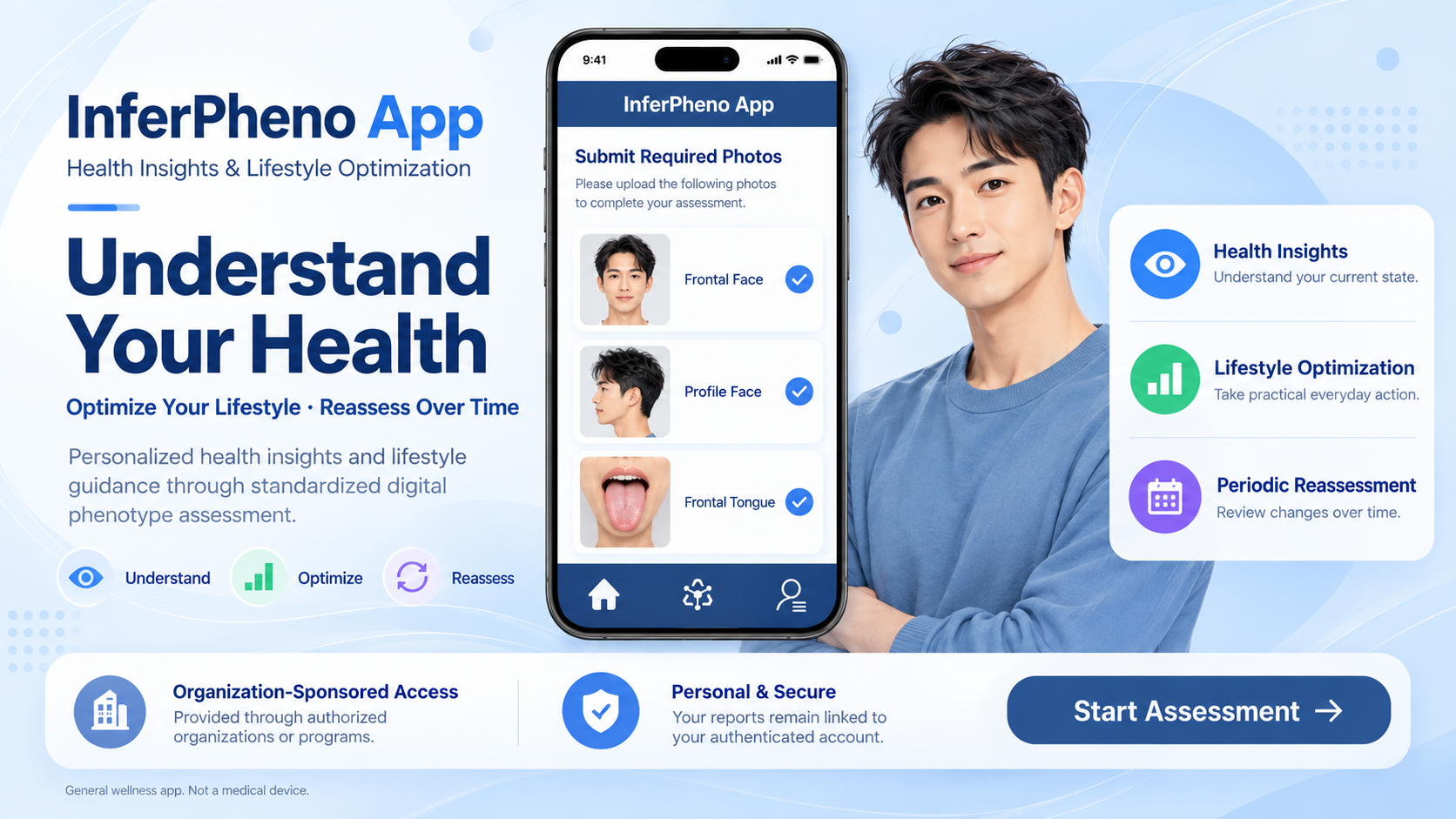
InferPheno App
Health Insights & Lifestyle Optimization
Understand Your Health · Optimize Your Lifestyle · Reassess Over Time
InferPheno App is ProXplor’s configurable digital phenotype application for delivering personalized health insights and lifestyle optimization through organization- and program-specific report models.
Powered by ProXplor Nexus™ and the InferPheno™ Digital Phenotype Inference Engine, the app enables enterprises, government institutions, government-linked companies, insurers, cooperatives, membership organizations, health and wellness organizations, and other authorized programs to provide personalized health and lifestyle reports to eligible users.
InferPheno App and the underlying InferPheno™ inference engine serve distinct roles within ProXplor’s technology architecture.
Different report models can be configured for different populations, program objectives, and service scenarios while preserving ProXplor’s underlying analytical framework, privacy principles, and general wellness boundaries.
01 | About InferPheno App
InferPheno App helps individuals better understand their current health-related state and identify practical opportunities for lifestyle optimization.
Using standardized digital phenotype images together with essential personal information, the app applies ProXplor’s inference framework to generate personalized health and lifestyle insights through the selected report model.
No specialized on-site assessment equipment is required. Users sign in, complete their personal information, activate the applicable organization access, and follow the image-capture guidance to submit an assessment. Their personal reports are then available through My Reports.
InferPheno App is not designed around a single result. Its purpose is to help users move from understanding their current state to taking appropriate lifestyle action and reassessing over time.
Understand → Optimize → Reassess
02 | Health Is Not a Static Result
InferPheno App approaches health as a dynamic process rather than a fixed result.
Daily routines, sleep, nutrition, physical activity, stress, emotional wellbeing, behavior, environment, and time provide important context for understanding everyday health and lifestyle.
A single assessment provides a reference point, not a complete picture of a person’s health.
The questions that guide the experience are:
What can I learn about my current state?
Which areas deserve greater attention?
What practical changes can I make in everyday life?
What differences do I notice when I reassess?
An assessment supports understanding. Lifestyle optimization supports action. Periodic reassessment provides an opportunity to review information from different points in time.
03 | Health Insights & Lifestyle Optimization
Health Insights
InferPheno App provides a personal report containing digital phenotype observations, model-based health and lifestyle insights, and practical areas for attention.
The selected report model determines how this information is organized and presented. Reports can include current health-related state references, lifestyle considerations, areas for continued observation, and guidance for periodic reassessment.
These insights are intended to support a more structured understanding of personal health and lifestyle. They are not diagnostic findings or a complete assessment of health.
Lifestyle Optimization
Reports connect relevant insights with practical lifestyle guidance.
Depending on the selected report model, guidance may address nutrition, physical activity, sleep and recovery, daily routines, stress management, emotional wellbeing, and other appropriate aspects of general wellness.
The purpose is to help users identify manageable changes in everyday life—not to prescribe medical treatment or guarantee a particular health outcome.
04 | Configurable Report Models
A defining capability of InferPheno App is its support for configurable report models.
A report model defines the structure, content modules, language, and presentation of a report. It is not a separate inference engine.
Organizations can work with ProXplor to configure reports for their program objectives and participating populations. Configuration can include:
Report identity and presentation: titles, information hierarchy, organization or program identification, and approved branding.
Health insight content: approved modules and areas of emphasis.
Lifestyle optimization content: approved guidance appropriate to the program and population.
Language and localization: language versions and appropriate localized presentation.
Reassessment information: report-level references for reviewing information over time.
Report configuration takes place within ProXplor’s controlled product framework. It does not change the app’s standardized analytical inputs, permit unrestricted changes to the underlying inference logic, or introduce diagnostic or clinical functions.
All report models available through InferPheno App remain within the same general wellness scope.
Organizations requiring an independently branded application, substantially different user experience, deeper workflow customization, or full white-label deployment can pursue a separate deployment through ProXplor Nexus™ Solutions.
Customization does not transfer ownership of ProXplor’s underlying proprietary technologies.
05 | Organization & Program Access
InferPheno App supports organization-sponsored and program-specific services for enterprises, government institutions, public-sector programs, government-linked companies, insurers, cooperatives, membership organizations, health and wellness organizations, and other authorized institutional programs.
Account Access and Service Authorization
Creating a personal account and activating organization access are separate steps.
Users can sign in, manage their personal profile, and access reports already associated with their account. Access to organization-sponsored assessments requires authorization under the relevant participating organization or program.
Organization Access Code
Participating organizations and authorized public-sector program administrators distribute Organization Access Codes to eligible users.
Users enter their code through Organization Access Code and select Verify Access. Successful activations are recorded in Access History.
Access codes are not available for individual purchase or independent self-registration. This restriction applies to organization access codes and does not prevent users from creating their personal sign-in account.
The applicable organization or program determines which assessment services and report models are available to the user.
Access & Payment
Eligible users receive the sponsored services made available under their organization or program without purchasing them individually.
InferPheno App does not provide public consumer purchases or subscriptions and does not provide an in-app mechanism for purchasing organization access codes.
Personal Information & Organization Access
Organization sponsorship does not grant a sponsoring organization access to an individual user’s personal reports, submitted photos, or identifiable health and lifestyle information.
Where program-level reporting is provided, information may be provided in appropriately aggregated or de-identified form in accordance with the applicable program terms, Privacy Policy, contractual requirements, and applicable law.
Individual-level information is not disclosed to a sponsoring organization unless the user separately authorizes the specific disclosure or the disclosure is otherwise required by applicable law.
InferPheno reports are not provided or authorized for use in insurance underwriting, premium pricing, claims decisions, insurance eligibility, recruitment, promotion, compensation, disciplinary action, termination, or other adverse decisions about an individual.
06 | Eligibility, Account & User ID
Eligibility
InferPheno App is intended for users 18 years of age or older.
Users must meet this age requirement to complete an assessment through the current version of the app.
Sign-In & User ID
Users sign in using Sign in with Apple or Sign in with Google.
When a user first signs in, ProXplor Nexus™ creates a unique User ID and associates it with the corresponding sign-in account.
This User ID connects the account with the user’s personal profile, organization access, available report models, assessments, and personal reports.
When the user returns through the same linked sign-in account, the existing User ID is recognized. A new User ID is not created for each sign-in or assessment.
The User ID is an internal account identifier. It is not a facial-recognition identifier, biometric template, or biometric authentication credential.
07 | How an Assessment Works
1. Sign In
Sign in using your Apple or Google account.
2. Complete Your Profile
Use Edit Profile to provide or update the personal information required for an assessment.
3. Activate Organization Access
Enter the Organization Access Code provided by your participating organization or program and select Verify Access.
4. Select a Report
Choose a report from the models available under your organization or program.
5. Review Processing Information & Provide Consent
Review the information explaining how your personal information and photos will be used and provide consent before the required photos are submitted for analysis.
6. Capture Your Photos
Follow the guidance to capture a frontal face photo, a profile face photo, and a frontal tongue photo.
7. Confirm & Submit
On Model Confirmation, review the selected report, personal information, and required photos before selecting Submit.
8. View Your Report
After processing is completed, open My Reports to view your personal health insights and lifestyle optimization guidance.
9. Reassess
When another assessment is available through your program, reassess at an appropriate interval and review your reports over time.
Assess → Understand → Optimize → Reassess
08 | Standardized Assessment Information
InferPheno App uses eight core analytical inputs:
Sex
Date of Birth
Long-Term Place of Residence
Height
Weight
Frontal Face Photo
Profile Face Photo
Frontal Tongue Photo
A Display Name is used for account identification and report presentation. It is not used in health analysis or inference.
Personal information can be reviewed and updated through Edit Profile and checked again before an assessment is submitted.
Long-Term Place of Residence refers to the city or region where the user usually lives. It is not the user’s birthplace or a request for a precise street address.
Height and weight are provided by the user. The app does not measure them through the camera.
Different report models use the same core analytical input structure. Report customization does not introduce additional analytical inputs.
09 | How to Capture Your Photos
Follow the on-screen capture guidance and review each photo before submission.
General Requirements
Use clear, even lighting and keep the camera steady. Make sure each image is in focus and correctly framed.
Avoid strong shadows, overexposure, beauty filters, color effects, digital enhancement, or anything that obscures the required visible features.
Frontal Face Photo
Face the camera directly with your head upright and centered. Keep your eyes naturally open and maintain a neutral expression.
Ensure that your full face is visible. Move hair or accessories away from features that need to be captured, and avoid tilting or rotating your head.
Profile Face Photo
Turn in the direction shown in the app and present a clear side profile.
Keep your head upright and ensure that the forehead, nose, lips, chin, and jawline are visible. Avoid turning partially back toward the camera.
Frontal Tongue Photo
Face the camera directly, open your mouth naturally, and extend your tongue forward in a relaxed manner.
Avoid excessive force or tension. Ensure that the visible upper surface of the tongue is clearly captured under even lighting.
Do not use filters or effects that alter its appearance.
Before Submission
Check that all three required photos are present, clear, and correctly positioned. Retake any image that does not follow the capture guidance.
The instructions displayed in the app for the assessment take precedence.
10 | Methodology & Limitations
What InferPheno App Does
InferPheno App applies ProXplor’s inference framework to standardized visual phenotype information together with user-provided personal information.
The system organizes the submitted information and generates model-based health and lifestyle insights through the selected report model.
Visual observations and model-based interpretations are not the same thing. Interpretations are inferences drawn from the available inputs, not direct measurements of internal physiological function.
The reports are intended to support health awareness, lifestyle reflection, practical lifestyle optimization, and periodic reassessment.
What InferPheno App Does Not Do
InferPheno App does not diagnose, detect, predict, confirm, or rule out disease.
It does not perform clinical screening, produce diagnostic findings, determine medical treatment, recommend prescriptions, or provide medical decision support.
A face or tongue image is not presented as a direct measurement of a medical or physiological parameter.
Factors Affecting Consistency
Results can be influenced by the accuracy of personal information and the quality and consistency of submitted images.
Relevant factors include lighting, image clarity, camera angle, framing, facial expression, temporary changes in visible appearance, recent food or beverages that alter visible appearance, and the use of filters or image enhancement.
Following consistent capture guidance supports more meaningful review across assessments, but it does not eliminate uncertainty or guarantee identical results.
Interpreting Your Report
Reports should be interpreted as general health and lifestyle reference information—not as clinical measurements or clinically validated diagnostic findings.
Differences between reports can reflect changes in submitted information, image conditions, normal variation, or model interpretation.
They do not, by themselves, establish that health has improved or deteriorated or that a lifestyle change caused a particular result.
11 | Information, Photo Processing & User Consent
Processing Purpose
Personal information and photos submitted for an assessment are securely transmitted to ProXplor Nexus™ and processed through the InferPheno™ Digital Phenotype Inference Engine to generate the selected personal report.
Core phenotype inference and report generation take place within ProXplor’s processing infrastructure rather than independently on the user’s device.
Photo Retention & Deletion
Submitted photos are automatically deleted from the processing environment once the report is generated or three minutes after upload, whichever occurs first.
Submitted photos are not retained as part of the user’s long-term account record.
Personal reports are stored separately and remain available through My Reports until deleted in accordance with the account and data-deletion policy.
Restricted Uses of Photos
Submitted phenotype images are not used for facial recognition, identity verification, biometric authentication, surveillance, advertising, cross-application tracking, data brokerage, or model training.
They are not sold, and the app does not create facial-recognition templates or biometric identity profiles from them.
Consent & User Choice
Before photos are submitted for analysis, users receive information explaining the purpose of processing, the information required, and the photo-deletion rule.
Users can decline to submit an assessment.
Users may withdraw consent for future processing or request deletion of retained personal information through Contact Support or the contact methods provided in the Privacy Policy. Permanent account deletion can be initiated directly through Delete My Account.
Withdrawal does not reverse processing that was lawfully completed before the withdrawal took effect.
Service Providers & Processing Locations
The InferPheno App Privacy Policy describes applicable service providers, processing and storage locations, cross-border transfers, retention rules, deletion practices, and users’ privacy rights and choices.
12 | My Reports & Periodic Reassessment
My Reports
Personal reports are generated through the InferPheno™ Digital Phenotype Inference Engine, stored in ProXplor Nexus™, and associated with the user’s unique User ID.
After sign-in, My Reports retrieves the reports associated with that account.
Users can access current and historical reports and review the corresponding report names and assessment dates.
Newly generated reports become available through My Reports after processing is completed.
Periodic Reassessment
Users can complete another assessment when access is available through their organization or program.
Current and previous reports provide reference points for reviewing health and lifestyle information over time.
For more meaningful comparison, users should use the same report model and follow consistent image-capture guidance.
Reassessment does not establish a diagnosis, prove the effectiveness of a lifestyle change, or constitute continuous physiological monitoring.
Understand the present.
Take appropriate action.
Reassess and review change.
13 | Powered by ProXplor Health Intelligence
InferPheno App is the user-facing application through which users submit assessments and access personal reports.
ProXplor Nexus™
Health and Medical Intelligence Foundation Model & Core Technology Platform
ProXplor Nexus™ provides the shared intelligence foundation and core technology infrastructure supporting ProXplor’s specialized inference engines, products, and solutions.
InferPheno™
Digital Phenotype Inference Engine
InferPheno™ is ProXplor’s specialized digital phenotype inference engine.
Within InferPheno App, it processes the standardized analytical inputs to support non-diagnostic health and lifestyle insights and report generation.
The application relationship is:
ProXplor Nexus™ → InferPheno™ Digital Phenotype Inference Engine → Configurable Report Models → InferPheno App
InferPheno™ is the inference engine. InferPheno App is the application.
ProXplor retains ownership and control of its underlying proprietary technologies.
14 | Account & Data Management
Users can manage their personal information through Edit Profile, activate organization access through Organization Access Code, review reports through My Reports, and obtain assistance through Contact Support.
Delete My Account
Users can initiate permanent account deletion directly through Delete My Account on the account page.
The app presents an Account Deletion Confirmation explaining the consequences. Users must acknowledge the deletion notice before confirming the request.
Account deletion permanently removes the InferPheno App account, its associated User ID, personal profile, stored personal reports, and associated account data from ProXplor Nexus™, subject only to specific records that must be retained by applicable law.
This is permanent account deletion, not temporary suspension or deactivation.
If a legally required record must be retained, the applicable information, reason, and retention period are described in the Privacy Policy and the applicable deletion process.
Once deletion is completed, the deleted account and associated data cannot be restored.
Registering again creates a new account and a new User ID. It does not recover previously deleted reports.
Deleting your InferPheno App account does not delete your Apple or Google account.
15 | No Physiological or Clinical Measurement
InferPheno App does not measure blood pressure, blood glucose, blood oxygen saturation, body temperature, heart rate, electrocardiographic activity, or other clinical physiological parameters.
The device camera is used to capture the required phenotype photos. It is not used to perform medical measurements.
The app analyzes submitted photos and user-provided personal information to generate model-based, non-diagnostic health and lifestyle insights.
The current version of InferPheno App does not integrate with Apple HealthKit and does not read data from or write data to the Health app.
16 | Important Health & Medical Information
InferPheno App is designed and offered as a general wellness application, not as a medical device.
All report models available through InferPheno App are intended for:
health insights;
general wellness;
proactive health;
lifestyle optimization;
health awareness; and
periodic reassessment.
No report model available through InferPheno App provides medical diagnosis, disease detection or confirmation, disease prediction, clinical screening, clinical measurement, medical treatment, prescriptions, emergency medical advice, or medical decision support.
InferPheno App reports do not replace medical advice, examinations, laboratory testing, diagnosis, treatment, or other care provided by appropriately qualified healthcare professionals.
Do not use an InferPheno App report to determine whether a disease is present or absent, start or stop medication, change prescribed treatment, or delay seeking appropriate medical care.
If you experience symptoms, have concerns about a medical condition, or need diagnosis or treatment, consult an appropriately qualified healthcare professional.
In an emergency, seek appropriate emergency medical assistance immediately.
17 | About ProXplor™
ProXplor™ is a systems science–driven health and medical intelligence research and technology platform.
ProXplor develops scientific and methodological frameworks, health and medical intelligence foundation models, specialized inference engines, technology platforms, products, and enterprise solutions.
Its work brings together health and medical science, systems science, data science, and artificial intelligence within defined scientific, professional, evidence, privacy, and regulatory boundaries.
The objective is not simply to generate more health data.
It is to make health-related information more structured, understandable, and useful and to support more proactive approaches to health and lifestyle optimization.
18 | Support & Contact
Use Contact Support in the app for assistance with account access, organization authorization, assessments, reports, privacy requests, or account deletion.
Use Feedback to submit comments about your app experience.
For support by email, contact hello@proxplor.com.
Please do not send assessment photos, medical records, passwords, or unnecessary sensitive personal information through ordinary email.
The InferPheno App Terms of Use and InferPheno App Privacy Policy provide further information about service conditions and data handling.
InferPheno App by ProXplor
Health Insights & Lifestyle Optimization
Understand Your Health · Optimize Your Lifestyle · Reassess Over Time
Powered by ProXplor Nexus™ and the InferPheno™ Digital Phenotype Inference Engine
ProXplor™
Systems Science–Driven Health & Medical Intelligence Research & Technology Platform